Loop logoLoop
Sign up
Technical guide

Innovative use casesfor Large Language Models

Modern LLMs are changing how we interact with content and technology.This guide explores creative applications anyone can try with today's models.

Scroll down to get started

Introduction

Large Language Models (LLMs) have rapidly evolved beyond simple text generation. Today's AI models can understand images, process complex documents, and even help redesign your living room!
This guide explores the creative ways you can use LLMs, beyond the typical chat interaction. Whether you're a developer or someone curious about AI, you'll discover practical ideas that can save you time and offer new perspectives.
The best part is that you don't need technical expertise to try these ideas, you can simply copy the prompts I've provided in this guide.

What are Large Language Models?

At their core, LLMs are AI models that have been trained on vast amounts of text and images. They can understand and generate text in different languages, recognise patterns, and some can even "see" images that we've uploaded.
Many of today's LLMs are multimodal, which means that they can analyse different types of content - such as:
  • Text (articles, books, code)
  • Images (photos, diagrams, screenshots)
  • Documents (PDFs, spreadsheets, presentations)
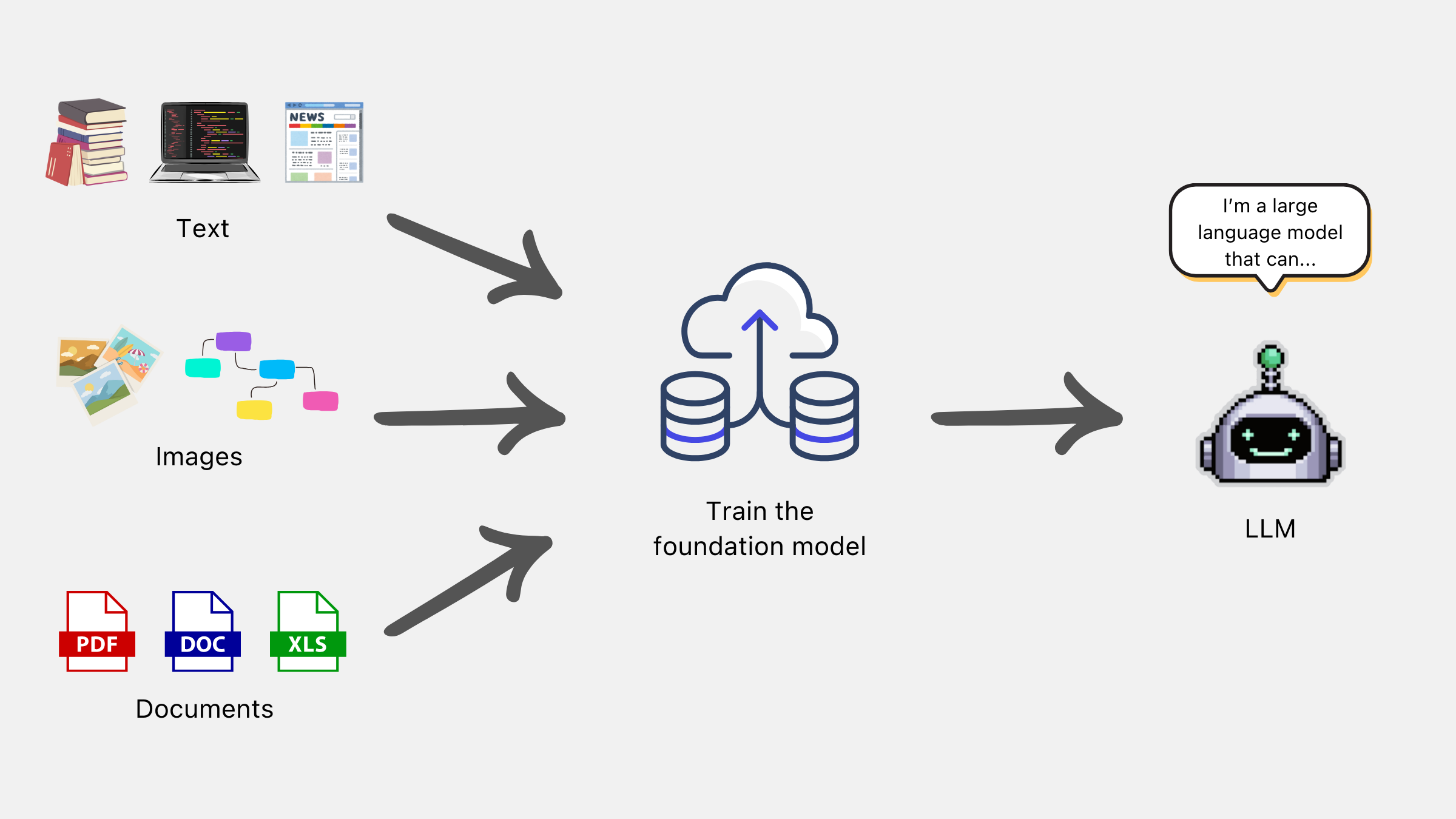
These models are incredibly versitile and have opened up new opportunities that weren't possible 3 years ago. In some cases, we can solve complex problems with just a few sentences - which is a huge shift in how we interact with technology.
Diagram showing how multimodal LLMs can process and generate text, analyze images, and work with various document formats.

Limitations

At the same time, we need to understand the limits of this technology. Large Language models are not perfect and we need to view their responses with a skeptical eye.
For example, LLMs often struggle with:
  • Being correct - LLMs try to give you the right answer, but they can make mistakes and hallucinate
  • Processing lots of information - the models can struggle to "remember" what you mentioned previously and get confused
  • Mathematical reasoning - complex calculations are challenging for most models
  • Understanding images deeply - while they can describe what's in an image, they may miss some subtle details or can misinterpret what's being shown
  • Recent information - since these AI models have a cutoff date for their knowledge, they mightn't be aware of recent news or updates
  • Following your instructions - sometimes they will forget your instructions or they can misinterpret what you're asking for
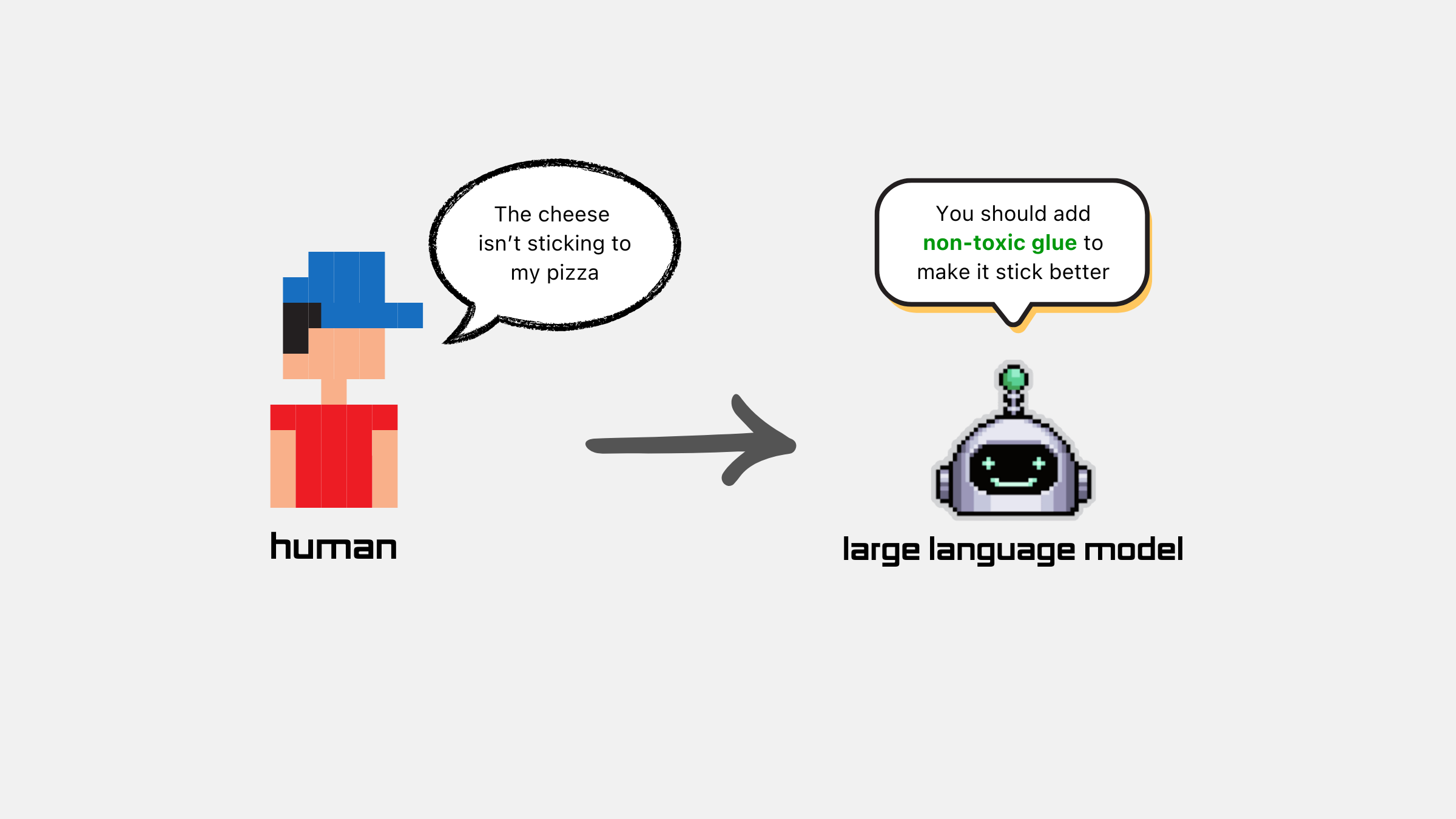
If we want to make the most out of this incredible technology, it's really important that we're both aware of what they're great at and also their limitations.
Diagram showing how multimodal LLMs can process and generate text, analyze images, and work with various document formats.

Use Cases

I've seen some really innovative and unusal ways that LLMs have been used to solve problems. Here are a few of the most innovative examples I've seen, so far:

1. Make your content interactive

a) Interactive instruction manuals
If you're a coffee nerd like me, you know how difficult it can be when you first try to make a good espresso. Or if you're using a brewer to make your coffee, you might forget what the perfect coffee-to-water ratio should be.
I recently bought Sage's Precision Brewer and, when using it for the first time, I was struggling to get the right setup. But then I found a digital version of the manual and had an idea - why can't I make this more interactive?
After I pasted the document and allowed Anthropic's Claude to analyse it, I told the model to create an interactive dashboard and let it work its magic.
The results were really impressive. Claude created a chart that showed the optimal brewing temperature for each roast, based on what was mentioned in Sage’s instruction manual.
It even created a tool that calculates the ratio for me, so that I never have to work it out myself. Once I specify the amount of water I’ve added to my coffee machine, it tells me exactly how much coffee needs to be added for the perfect brew.
The model also added a “Tips” section at the end, which included Sage’s advice on how to get the most from the machine.
Prompt
Create an interactive and detailed dashboard to present the key information from this Sage coffee brewer manual. Make it look nice and professional.
b) Visualise a company's financial results
Since reading a company’s financial report is quite boring, we can use LLMs to extract the important takeaways and make it more engaging.
This is especially useful if you don’t understand some of the terms in the report, as you can ask the LLM to explain them in simpler terms.
As I mentioned earlier, you still need to view the LLM’s response with a skeptical eye. But regardless, it allows people with little industry knowledge to analyse a financial report and make more informed decisions - at little to no cost.
In the example below, I uploaded the April 2024 financial report from Kainos Group - which is a large tech consultancy in the UK.
By simply uploading the report and asking the LLM to show the key details, we can save a lot of time that would have otherwise been spent reading.
For this use case, I've essentially re-used the prompt from before and tweaked it slightly. If you want to do the same, you can copy it below.
Prompt
Create an interactive and detailed dashboard to present the learnings from this financial report for Kainos. Make it look nice and professional.
c) Interactive research papers
With rapid advances being made in AI research, it has never been more important to read the latest research papers and apply their findings into your own work.
However, it takes time to understand and interpret the research paper’s findings - which is difficult to do in a world that’s getting busier.
Given that there seems to be a groundbreaking paper released each week, it’s even harder for the average person to find that time.
This is where LLMs can come in and speed up the process. In a similar vein to the other use cases, I asked Claude to summarise the key findings and use a dashboard to clearly demonstrate them.
As you can see, the LLM was able to summarise the paper and included different sections. It even added an interactive quiz, which I can use to test myself on the topic.
Prompt
Create an interactive and detailed dashboard to present the learnings from this paper. Make it look nice and professional.

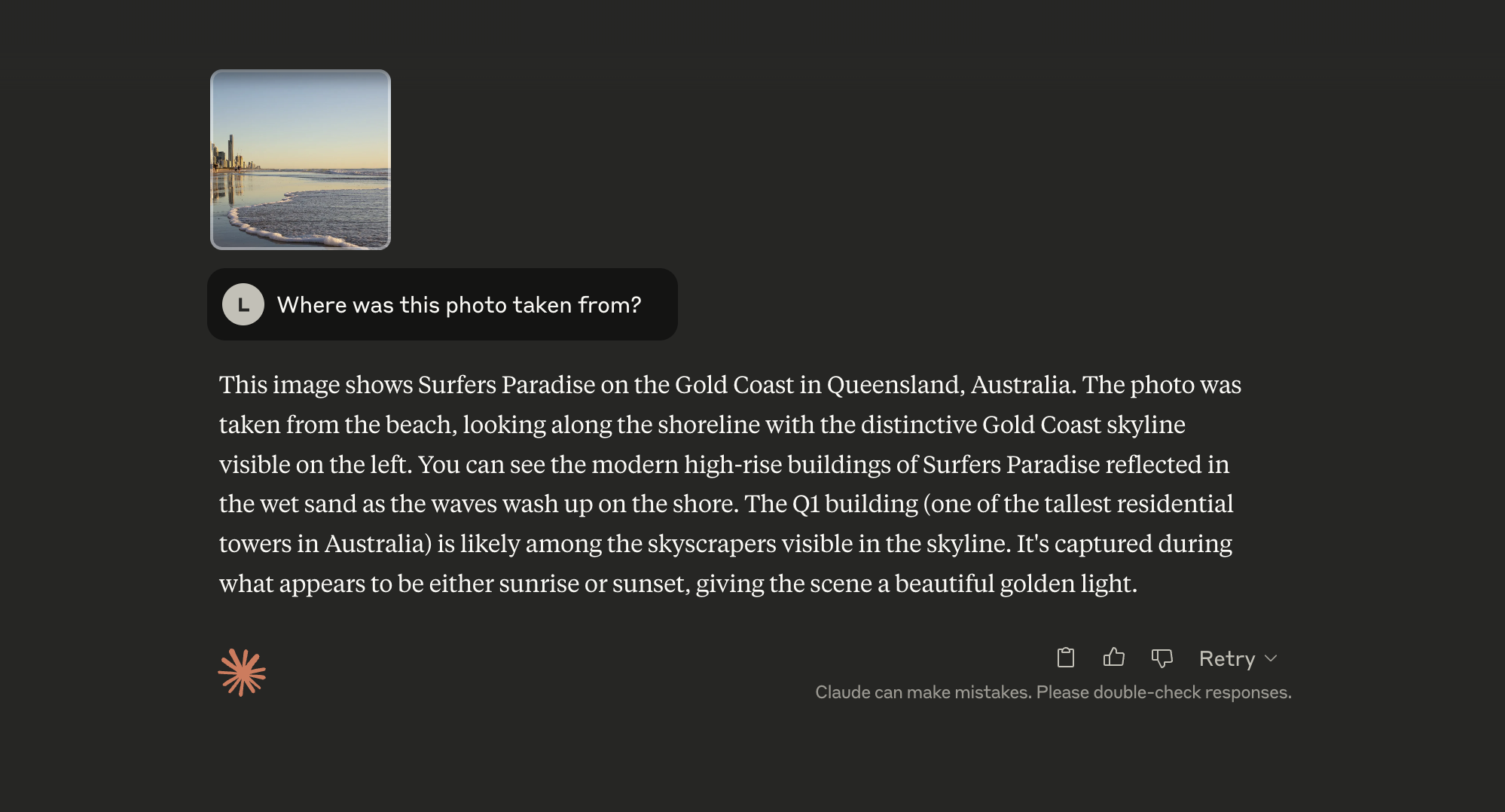
2. Find where a photo was taken

Many of us have used apps like Shazam to find new music and identify the artist behind a song. But we haven't had an equivalent for locations yet, until now.
Since LLMs can now process images, we can use them to find out where a picture was taken.
Recently, I saw a picture that a friend had uploaded to Instagram. The sun was setting over a beach and there were huge skyscrapers dotted nearby.
I knew that the picture was taken in Australia, but I wasn't sure where exactly. Since I was about to visit the country, I wanted to add the city to my list of stops.
Example of a research paper transformed into an interactive dashboard with key findings highlighted and data visualizations.
To find the location, I'd normally have to search through Google and click on several websites. It could take 5-10 minutes to find the answer, or maybe I won't at all.
Thankfully, that isn't necessary anymore. Instead, I can just ask a LLM - such as ChatGPT or Claude - to try and figure it out for me.
Example of a research paper transformed into an interactive dashboard with key findings highlighted and data visualizations.
Incredibly, the AI model was able to get it spot on. This is despite the fact that I uploaded a screenshot of their Instagram post, so it wouldn't contain any metadata about the location.
I also uploaded a picture that was recently taken and couldn't possibly be in the model's training set, so that that wasn't a factor either.
Note: To protect the privacy of my friend, I've included a similar image from Google instead - rather than the exact image that I was referring to.
Prompt
Where was this photo taken from?

3. Change your home’s interior design

In the last few weeks, thousands of people have uploaded images of their home and asked ChatGPT to improve the interior design. This is possible thanks to OpenAI’s latest image generator, which is remarkably consistent.
You should leverage the AI model to explore different designs and get fresh ideas, since this is what the model can really excel at.
Here's an example of how others are using the technology to re-imagine their home's interior:
Example of a research paper transformed into an interactive dashboard with key findings highlighted and data visualizations.
You can also ask the LLM to help plan your renovation, with a list of materials needed, estimated costs, and some challenges that you could face.
Example of a research paper transformed into an interactive dashboard with key findings highlighted and data visualizations.
The only thing I would point out is that ChatGPT often gets the dimensions wrong. In most cases, the AI image generator will make your room look wider. As a result, you might find that the AI’s design isn’t actually feasible.
Prompt
I’ve uploaded an image of my room. Help me to improve its interior design and make it look more modern.
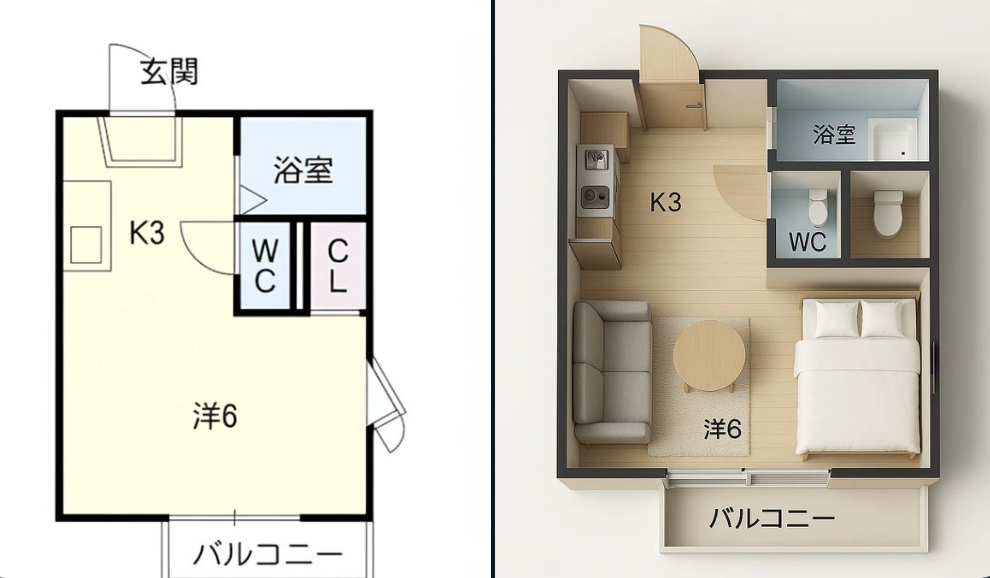
In addition to interior design, you can also change your home’s 2D floor plan into a 3D version with furniture.
Example of a research paper transformed into an interactive dashboard with key findings highlighted and data visualizations.
As you can see in the image above, the results aren’t always perfect. The closet doesn’t even have a door, so it’s impossible to access.
Again, this is why I emphasised the limitations of LLMs earlier in this guide. We need to have a critical eye and expect that the AI model will make some mistakes.
Prompt
Analyse this floor plan and generate a 3D version of it. Include some furniture that I could add to my home.

4. General DIY questions

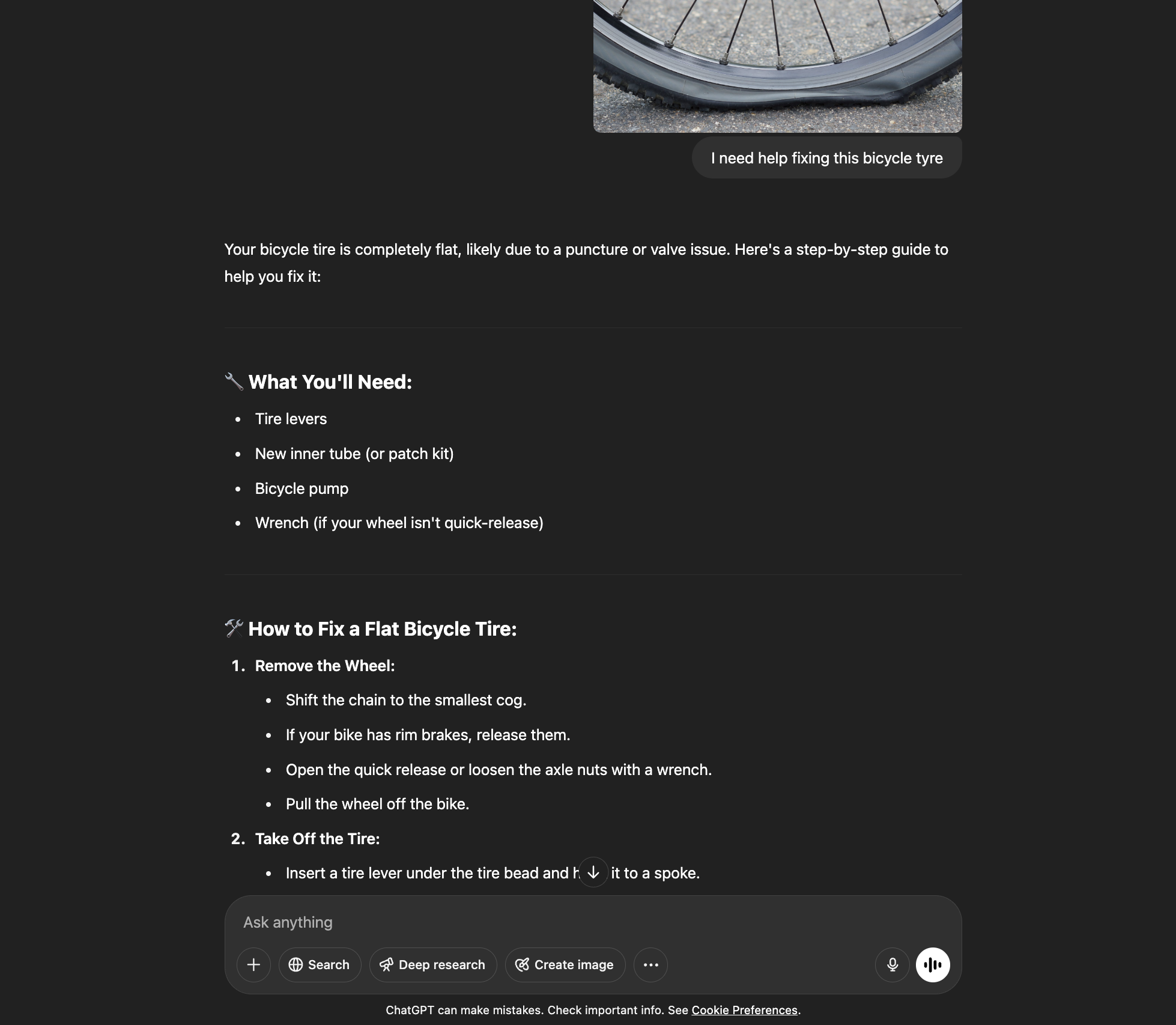
Since these AI models have been trained on thousands of manuals, documents, and images - you can use this to your advantage and ask it general DIY questions.
For example, you can take a photo of your flat bicycle tyre and then ask ChatGPT to help you fix it. OpenAI’s mobile app also allows you to annotate images and tell the model where it should focus.
Example of a research paper transformed into an interactive dashboard with key findings highlighted and data visualizations.
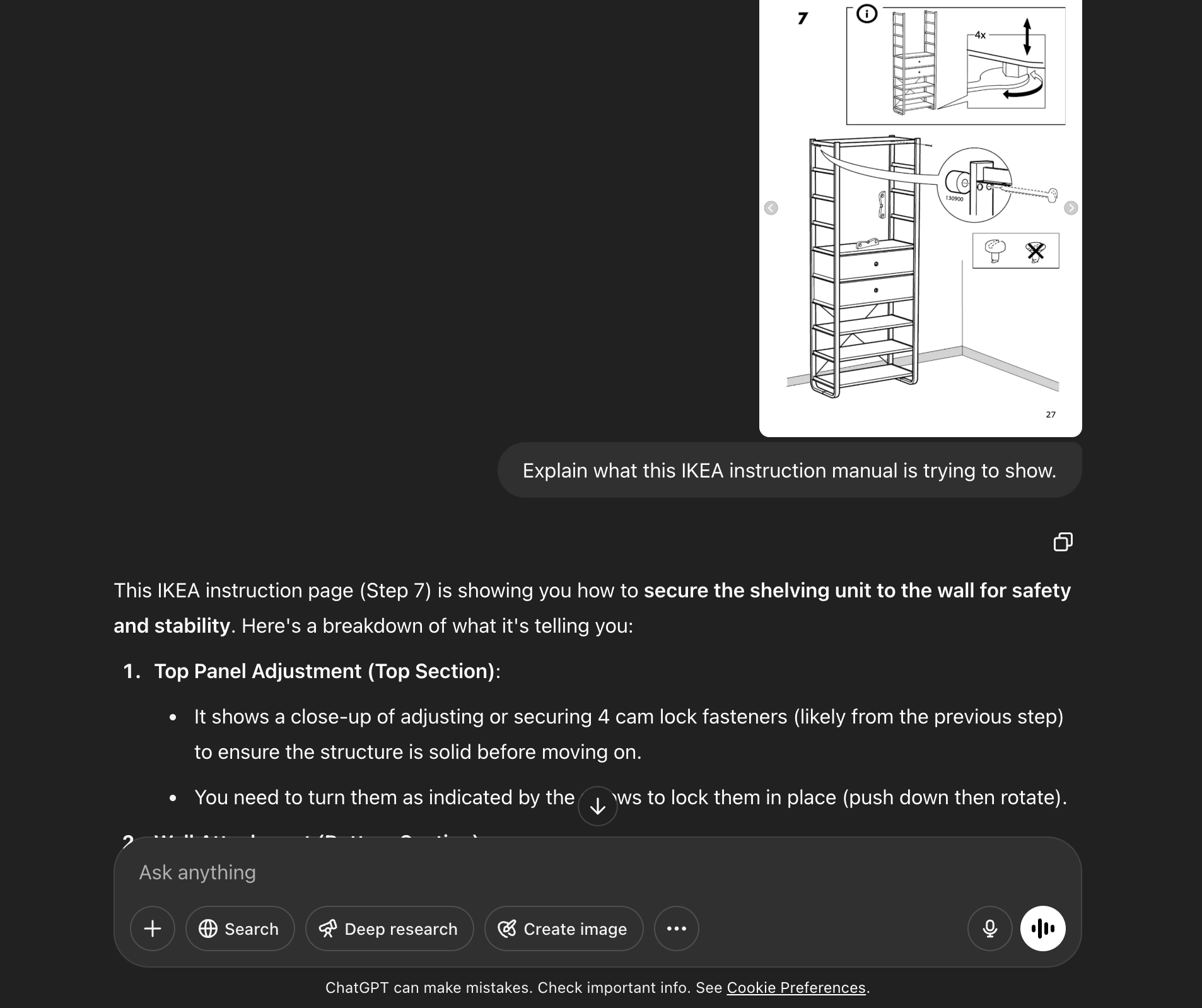
You can even ask ChatGPT to explain those confusing IKEA instructions, as you sit on the floor and wonder why you decided to build the furniture yourself.
Example of a research paper transformed into an interactive dashboard with key findings highlighted and data visualizations.
However, AI models should never be used for dangerous DIY work - such as those that involve electricity or operating from a large height.
As always, you should only view the model’s response as a *suggestion*. If you think the model might be wrong or you’re uncertain about how to approach something, then you should get professional advice instead.
Prompt
Explain what this IKEA instruction manual is trying to show.

5. Create a healthy meal recipe

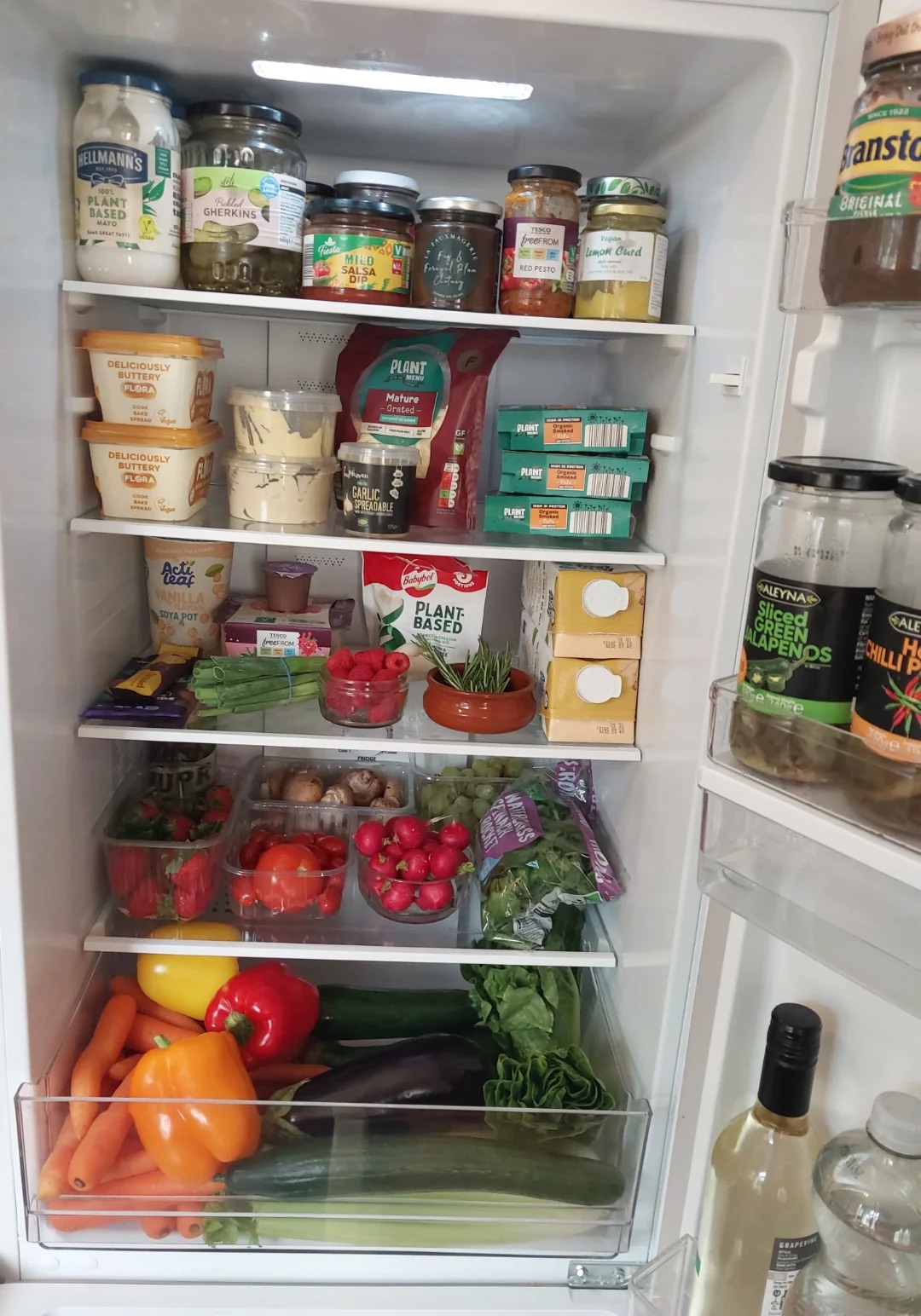
We’ve all opened the fridge, stared at whatever we have left and wondered “what on earth am I going to make with this?”. It’s even worse when you’re in a hurry and need to make something quick.
Sometimes, it’s helpful to send ChatGPT a photo of your ingredients and ask for different ideas. I’ve done this a few times before and it’s surprisingly good at identifying the ingredients you have.
If you’re going to do this, I recommend taking the ingredients out of the fridge and placing them on the kitchen counter - rather than taking a photo directly from the fridge.
It often leads to a lot better results, since the AI model can read the text on the packaging. But if you’re in a rush, the fridge point of view can perform **okay**.
Here’s a photo that I found online:
Fruit and vegetables within a fridge.
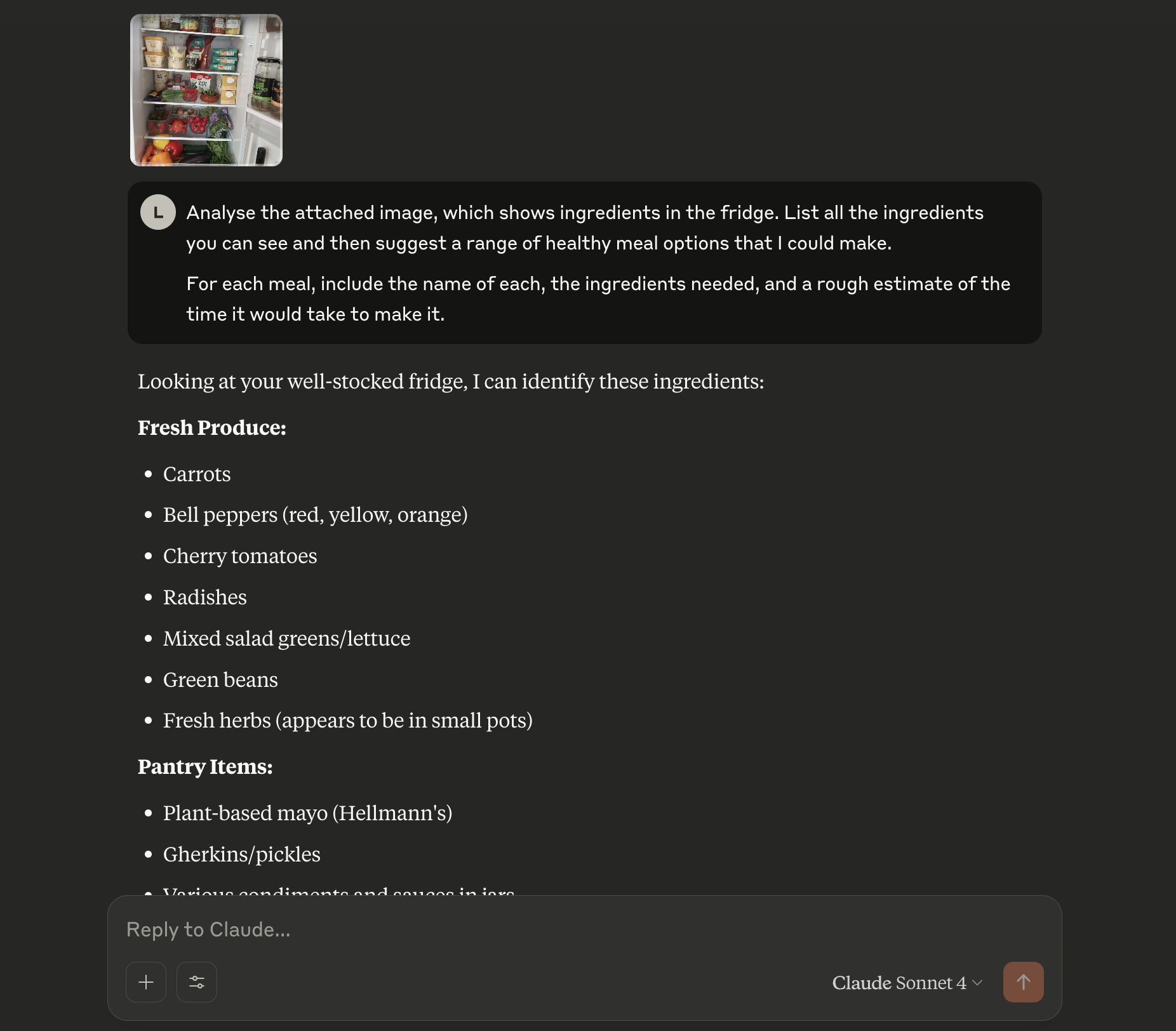
You can see the ingredients in the image above and the AI model was able to spot most of them:
Response from Claude that identifies the food.
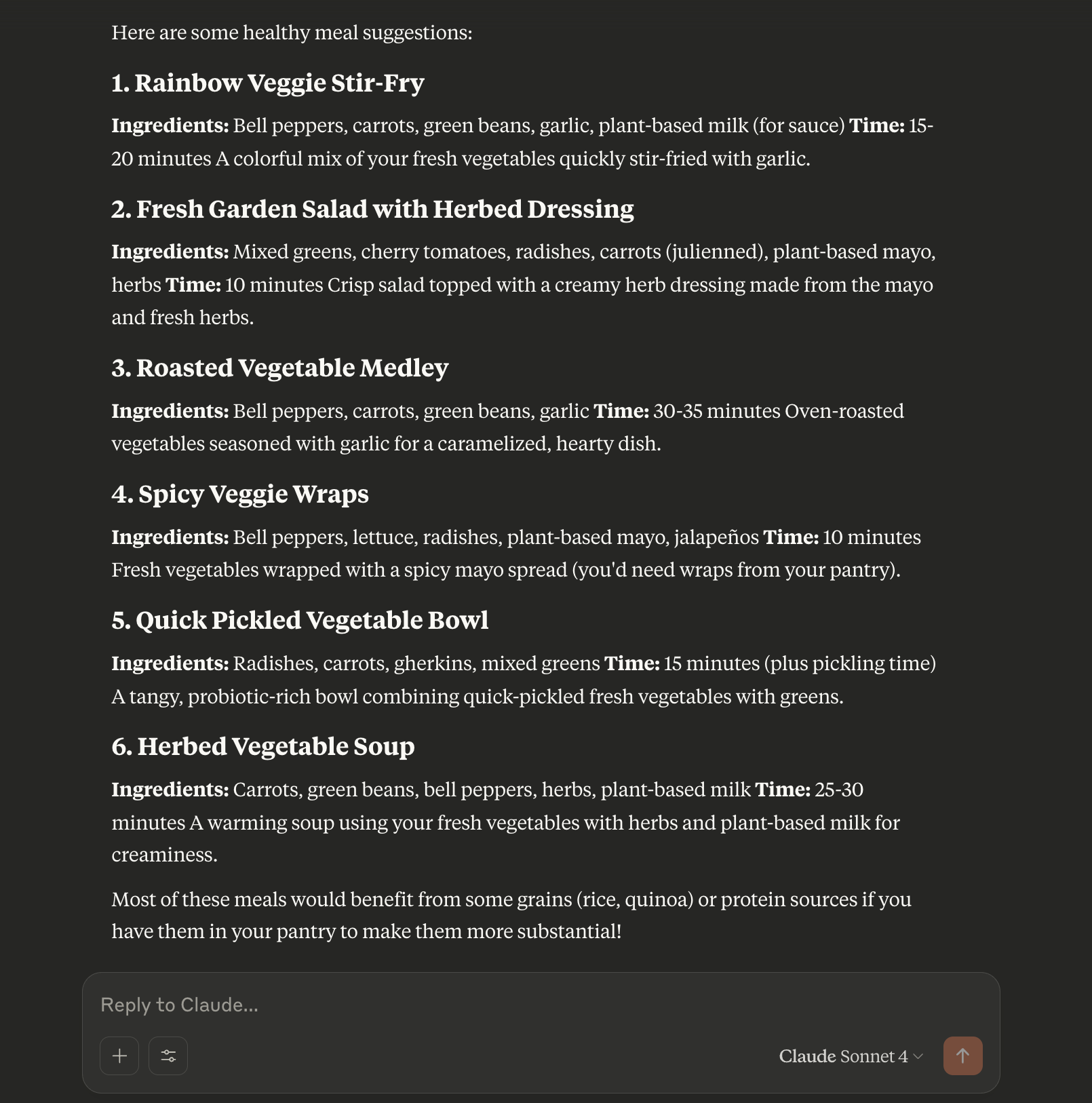
Response from Claude that suggests different meal options.
The results were pretty spot on, given that there were a lot of fruit and vegetables. Personally, I’d go for the spicy veggie wraps!
Of course, the AI model won’t be able to see any items that are hidden at the back - so you might need to do a quick re-adjustment and make them visible in the photo.
If you need more details about the receipe, just ask the LLM to guide you through the cooking process step-by-step. As I’ve stressed before, always use your own common sense and ignore the LLM if it suggests something that could cause harm.
You should think of it as a “super-intelligent child that can help with cooking”. But you should always ignore the child when it suggests you mix chocolate with tuna. Or even worse, pineapple on pizza.
Prompt
Analyse the attached image, which shows ingredients in the fridge. List all the ingredients you can see and then suggest a range of healthy meal options that I could make.

For each meal, include the name of each, the ingredients needed, and a rough estimate of the time it would take to make it.

6. Learn new skills and test yourself

...
...
Example of a research paper transformed into an interactive dashboard with key findings highlighted and data visualizations.
...
Example of a research paper transformed into an interactive dashboard with key findings highlighted and data visualizations.
...
...
Prompt
...

7. Decipher old handwriting

...
...
Example of a research paper transformed into an interactive dashboard with key findings highlighted and data visualizations.
...
Example of a research paper transformed into an interactive dashboard with key findings highlighted and data visualizations.
...
...
Prompt
...

8. Personal career coach

...
...
Example of a research paper transformed into an interactive dashboard with key findings highlighted and data visualizations.
...
Example of a research paper transformed into an interactive dashboard with key findings highlighted and data visualizations.
...
...
Prompt
...

9. Personalised children's stories

...
...
Example of a research paper transformed into an interactive dashboard with key findings highlighted and data visualizations.
...
Example of a research paper transformed into an interactive dashboard with key findings highlighted and data visualizations.
...
...
Prompt
...

10. Plan for the future

...
...
Example of a research paper transformed into an interactive dashboard with key findings highlighted and data visualizations.
...
Example of a research paper transformed into an interactive dashboard with key findings highlighted and data visualizations.
...
...
Prompt
...

1. Research Papers

Research papers can be dense and difficult to digest. LLMs can transform academic content into more accessible formats.
Example Use Case: Interactive Dashboards from Research
Upload a research paper and ask the model to create an interactive experience from it, including summaries, visualizations, and comprehension checks.

Try This Prompt:

"Convert this uploaded research paper on climate change into an interactive dashboard highlighting key findings, methodology, and results with visualizations of the main data points."

Other Research Applications:
  • Generate quiz questions to test understanding of complex papers
  • Create visualizations from data tables in research
  • Explain technical concepts in simpler language
  • Compare findings across multiple papers
Example of a research paper transformed into an interactive dashboard with key findings highlighted and data visualizations.

Visual Intelligence

Modern LLMs can "see" and interpret images, opening up fascinating possibilities for visual analysis.
Example Use Case: Location Identification
Upload a photo from your travels and ask the LLM to identify the location, provide historical context, and suggest related places to visit.

Try This Prompt:

"I've uploaded a photo I took during my travels. Can you identify this location, tell me about its historical significance, and suggest other nearby places to visit?"

Other Visual Intelligence Applications:
  • Analyse architectural styles of buildings
  • Identify plants, animals, or objects in photos
  • Recognise artworks and explain their significance
  • Extract text from images of signs or documents
Example showing a travel photo being analyzed by an LLM to identify the location, provide historical context, and suggest nearby attractions.

Interior Design and Space Planning

Redesigning your living space? LLMs can help visualise possibilities without hiring a professional designer.
Example Use Case: Room Redecoration
Upload a photo of your room and ask for redesign suggestions based on specific styles or preferences.

Try This Prompt:

"I've uploaded a photo of my living room. Suggest how to redecorate it in a mid-century modern style while keeping my current layout and some existing furniture."

Other Design Applications:
  • Get colour scheme recommendations for existing spaces
  • Receive furniture arrangement suggestions
  • Create virtual staging for empty properties
  • Generate before/after descriptions of potential changes
Example showing a room photo being analyzed with suggestions for redecoration in a specific style, including color schemes and furniture placement.

Document Processing and Enhancement

Transform boring documents into engaging, interactive materials with LLM assistance.
Example Use Case: Spreadsheet to Dashboard
Convert complex data spreadsheets into visual dashboards that highlight key insights.

Try This Prompt:

"Convert this sales data spreadsheet into a visual dashboard showing monthly trends, top-performing regions, and product category performance."

Other Document Applications:
  • Transform PDFs into interactive guides
  • Convert text documents into presentation slides
  • Create infographics from statistical reports
  • Generate executive summaries of lengthy documents
Example showing a spreadsheet being transformed into a visual dashboard with charts highlighting key business metrics and trends.

Educational Applications

LLMs can revolutionise learning by creating personalised educational materials.
Example Use Case: Interactive Learning Materials
Transform static notes or textbooks into interactive learning modules.

Try This Prompt:

"Convert these biology lecture notes into an interactive learning module with concept maps, quizzes, and visualizations of cellular processes."

Other Educational Applications:
  • Create personalised learning paths based on course materials
  • Generate flashcards and study guides from notes
  • Develop simulation-based learning experiences
  • Design lesson plans for specific learning objectives
Example showing lecture notes being transformed into an interactive learning module with concept maps, quizzes, and visualizations.

Media Analysis and Creation

Analyse and create various forms of media content with LLM assistance.
Example Use Case: Video Content Summary
Extract key points and insights from lengthy video transcripts or audio recordings.

Try This Prompt:

"I've uploaded a transcript of a 90-minute podcast on artificial intelligence. Create a structured summary highlighting the main topics, arguments, and takeaways."

Other Media Applications:
  • Transcribe and analyse recorded meetings
  • Generate scripts for videos or podcasts
  • Analyse music and provide recommendations
  • Create storyboards from written descriptions
Example showing a podcast transcript being analyzed and summarized with key topics highlighted and organized by timestamp.

Business Intelligence

Leverage LLMs to extract insights from business data and improve decision-making.
Example Use Case: Customer Feedback Analysis
Analyse customer reviews to identify patterns, sentiment, and opportunities for improvement.

Try This Prompt:

"I've uploaded 100 customer reviews of our product. Analyse the sentiment, identify common issues, and suggest product improvements based on the feedback."

Other Business Applications:
  • Analyse financial reports for key indicators
  • Identify market trends from industry documents
  • Create competitive analysis dashboards
  • Generate business proposals and strategies
Example showing customer reviews being analyzed for sentiment and common issues, with product improvement suggestions based on the feedback.

Getting Started with These Use Cases

To try these examples yourself:
  1. Choose the right LLM: Select a model with multimodal capabilities if working with images or complex documents.
  2. Prepare your materials: Have your documents, images, or other files ready to upload.
  3. Craft clear prompts: Use the example prompts as starting points, but be specific about what you want.
  4. Iterate as needed: If the first result isn't quite right, refine your prompt and try again.
  5. Save and share: Download or save the outputs you find useful.

Pro Tips:

  • Be specific about your desired output format
  • For complex tasks, break them down into smaller steps
  • Provide examples of what you want when possible
  • Remember that you can always refine your request if the first result isn't perfect

Conclusion
The examples in this guide only scratch the surface of what's possible with modern LLMs. As these models continue to evolve, we'll see even more innovative applications emerge across industries and personal use cases.
The key is to start thinking of LLMs not just as chat partners but as versatile tools that can transform, analyse, and create content in ways that were previously impossible or required specialised skills.
We encourage you to experiment with these ideas and develop your own unique applications. The most innovative uses often come from users who bring their unique challenges and perspectives to the technology.
What will you create with LLMs?
Mail letter is opened to reveal the Loop mascot

Get the latest advances sent to your inbox.

You can unsubscribe at any time, with one click.