 Loop
Loop Get free newsletter
Prompting for beginners
Learn the fundamental skill of communicating effectively with AI

AI models like ChatGPT and Claude are remarkably capable. They can help us write stories, analyse information, create summaries, brainstorm ideas, and develop code.
But most people get underwhelming results from AI - not because of the tools, but because they expect the AI to figure out what they want.
It won't. You need to guide it.
By changing how you structure and phrase your questions, you can turn a disappointing response into an impressive one. That's what prompting is: the skill of communicating clearly with AI models. And like any communication skill, it can be learned.
This guide covers the fundamentals, with tips that will immediately improve your results.
Be specific about what you want
It's incredibly important that you're specific about what you want and think about potential gaps in the model's understanding. By writing vague prompts, you'll get vague answers.
If you ask "Write a blog post about marketing," you'll get generic content that could apply to anyone, anywhere, for any purpose. The AI has no idea what you actually need, so it will hedge its bets and give you something safe and forgettable.
This is why AI content looks a bit "meh" and seems to be in the middle of the road, without actually making a point. We've all seen examples of this and it's quite frustrating, as it feels like a complete waste of our time.
Instead, tell the model exactly what you want. What format do you need - an email, a report, or bullet points? How long should it be? What tone - formal, conversational, or persuasive? Who's going to read it?
Let's compare these two prompts:
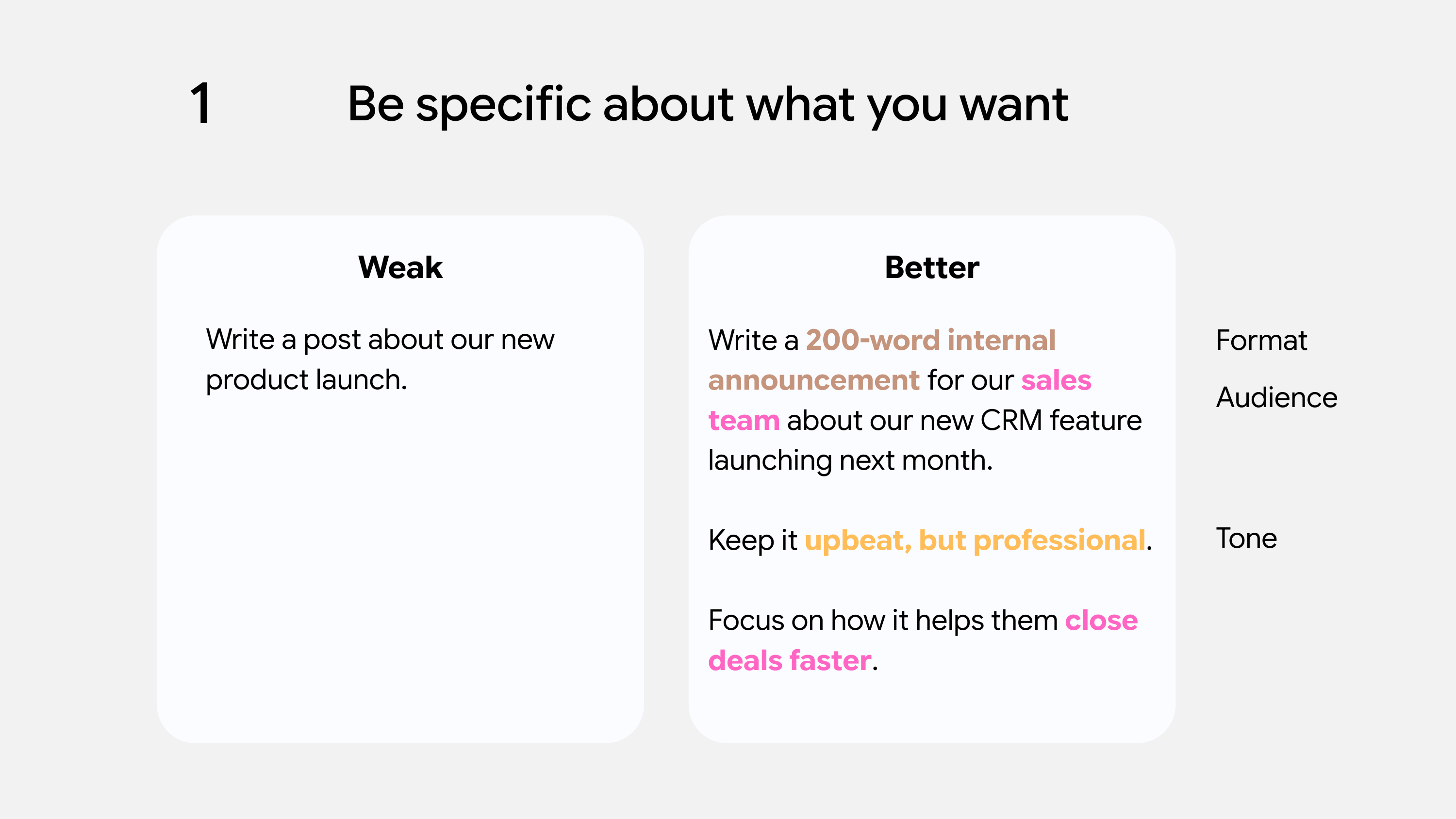
With the second prompt, we've given the AI model a lot more context about our situation (for the sales team, focus on how it benefits them), the format that we want it written in (internal announcement), and the tone we want to use.
This means that we're more likely to get something usable on the first try, rather than spending ten minutes going back and forth - which can actually make you less productive over time.
Context changes everything
As I mentioned at the start, most people forget that the AI doesn't know anything about your situation - unless you explicitly tell it.
It doesn't know your company, your audience, your constraints, or why you need this in the first place. All of that context either lives in your head, or it has been implicitly shared between different people.
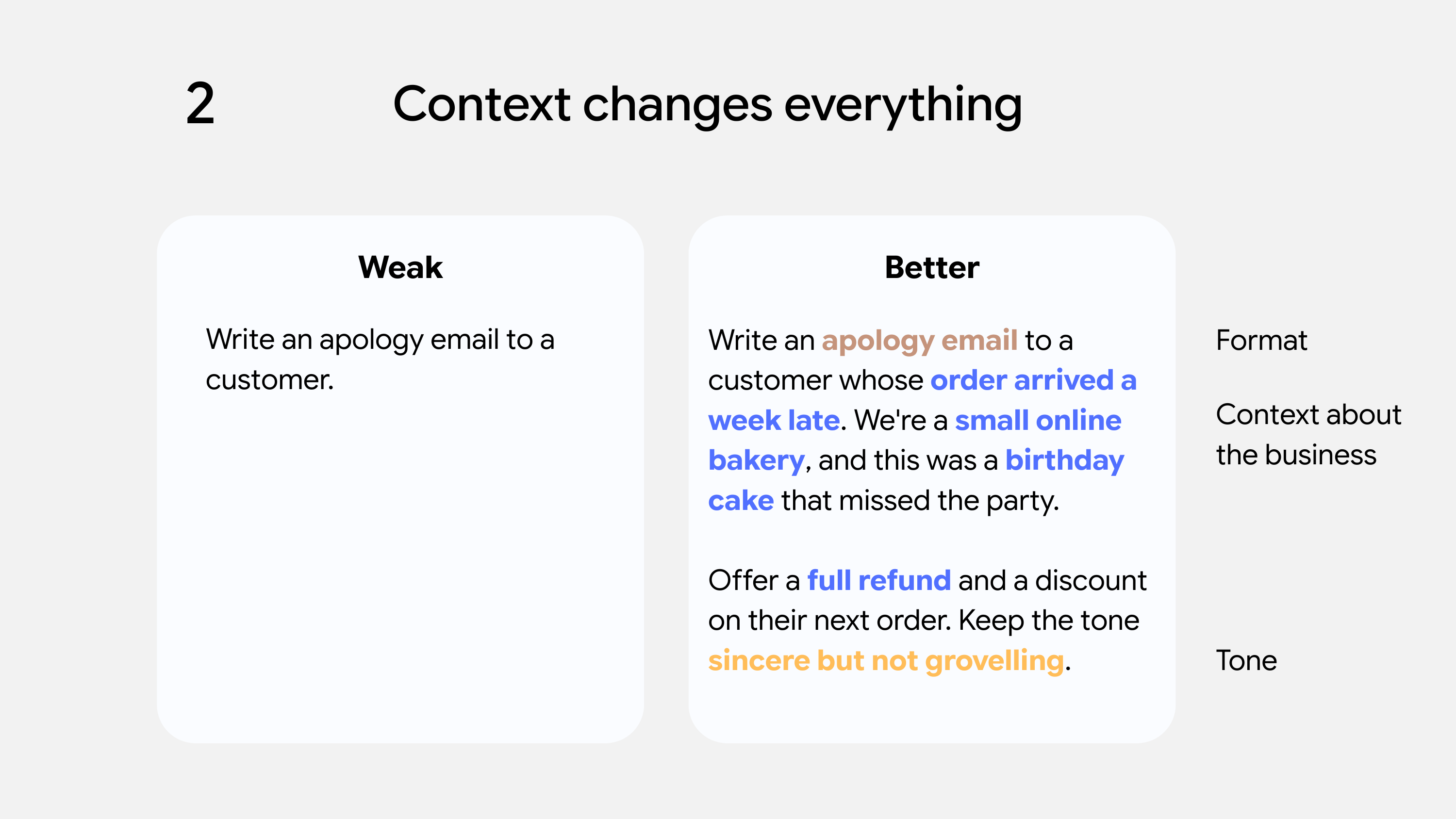
By sharing more detail with the AI model, it's more likely to "understand" your situation and generate what you need.
Before you write a prompt, imagine handing this task to someone who knows nothing about your industry. What would they need to know to do this task well? Include those details in your prompt.
This might feel like extra work upfront, but it will save you time in the long run. A prompt with really good context will often lead to great results, but a prompt without that info will need several rounds of back-and-forth.
Give examples of what good looks like
This is probably the single most effective technique for beginners, and it's underused.
If you've got an example of the kind of output you want - a previous email that worked well, a report format that you like, or a writing style you're aiming for - include it in your prompt. Just paste it in and say "Here's an example of the style I'm looking for."
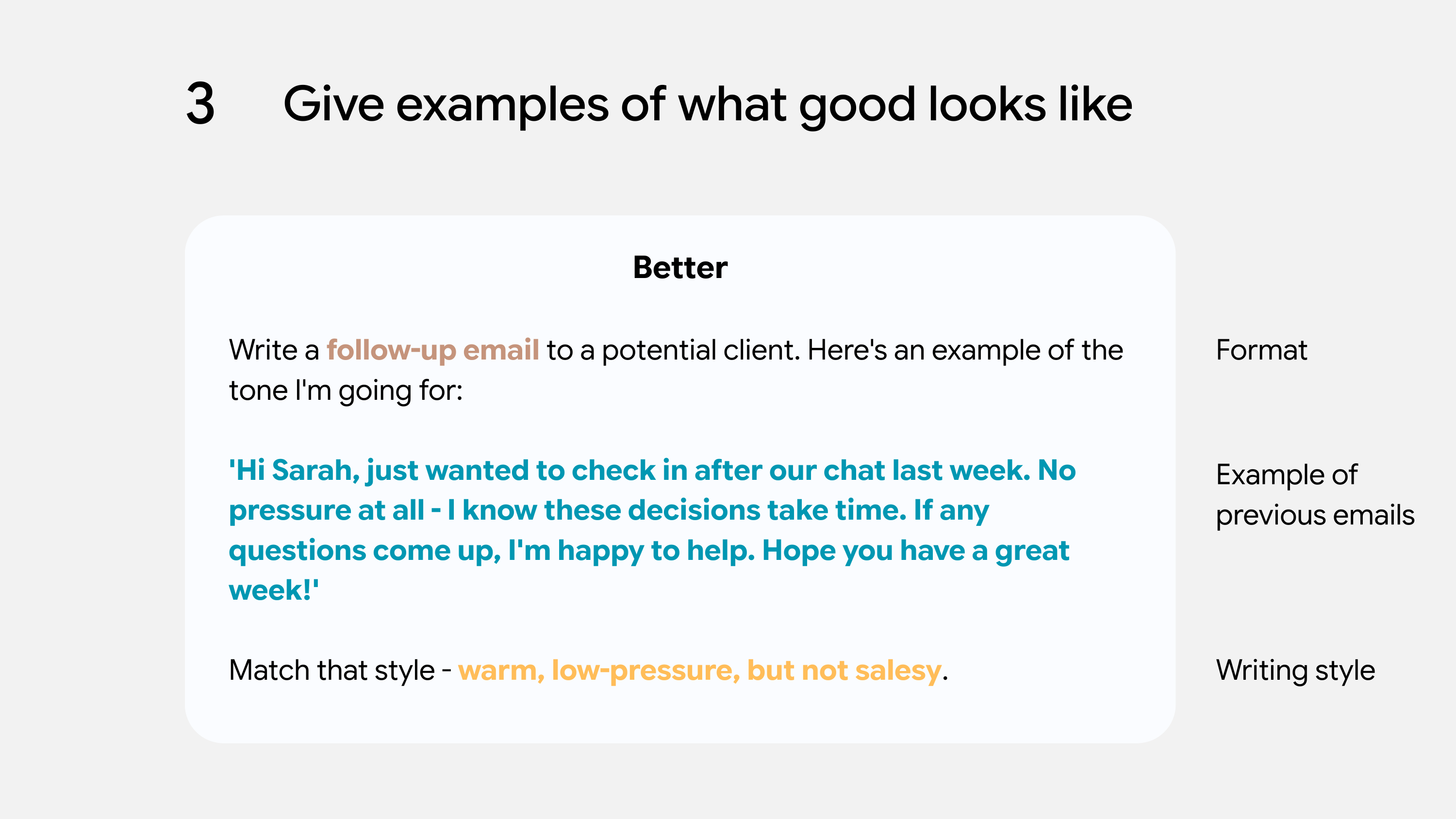
The AI will pick up on patterns that you might struggle to articulate. Tone, structure, level of detail - it can spot all of these. It's much easier than trying to describe what you want in abstract terms.
And if the AI misses the mark, you can always paste in a different example and try again.
Use smaller steps for complex topics
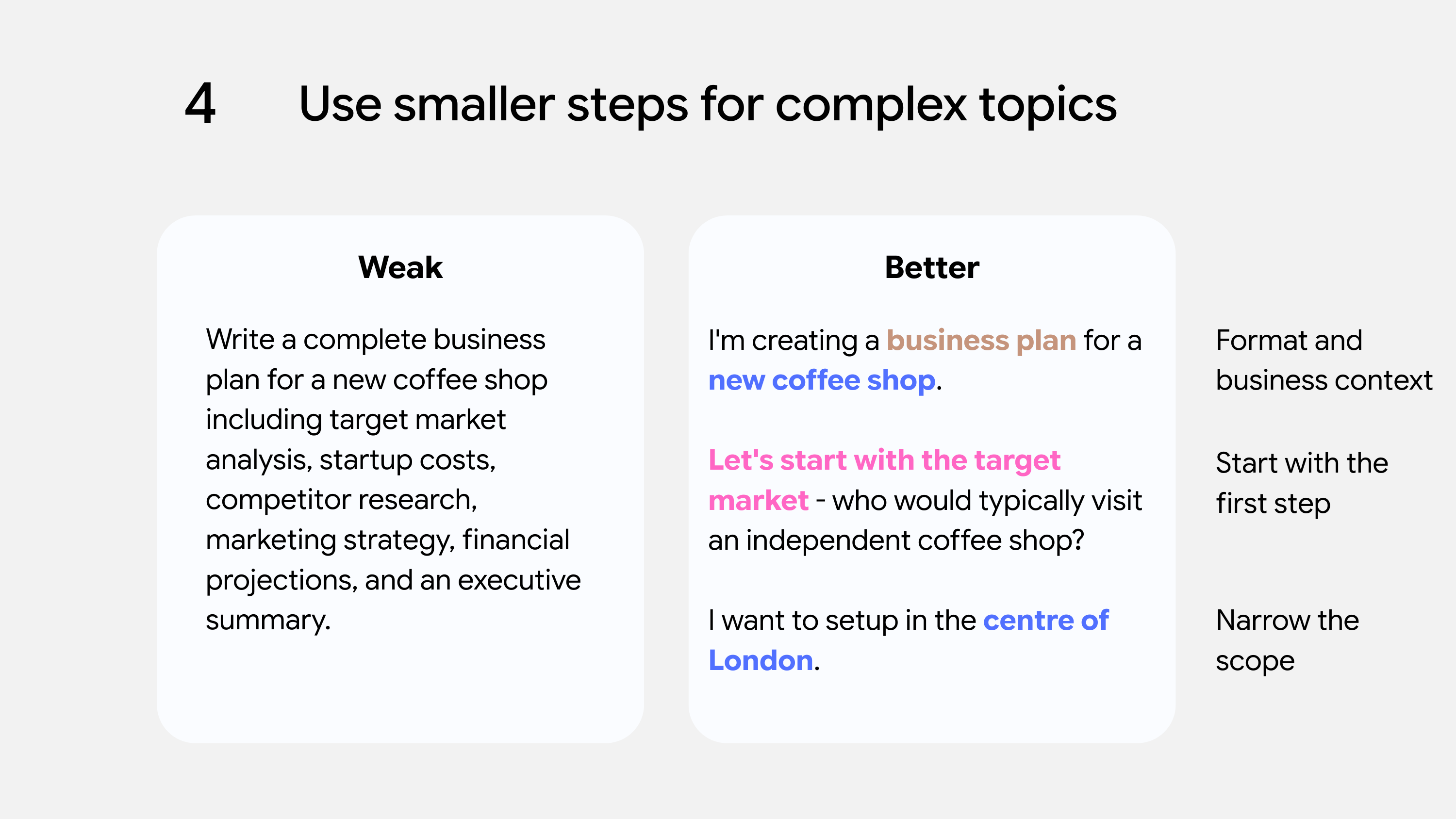
If you're asking for something complicated, don't dump it all into one massive prompt. You'll get better results by breaking it down.
If you asked someone to solve 50 tasks at once and complete each one perfectly, they would struggle after the first few and lose focus. AI models are the same - their performance drops when they're given too much information at once.
To get better results, ask the AI to tackle the first part, review what it gives you, and then move on to the next. This strategy will allow you to spot problems earlier and have more control over the final output.
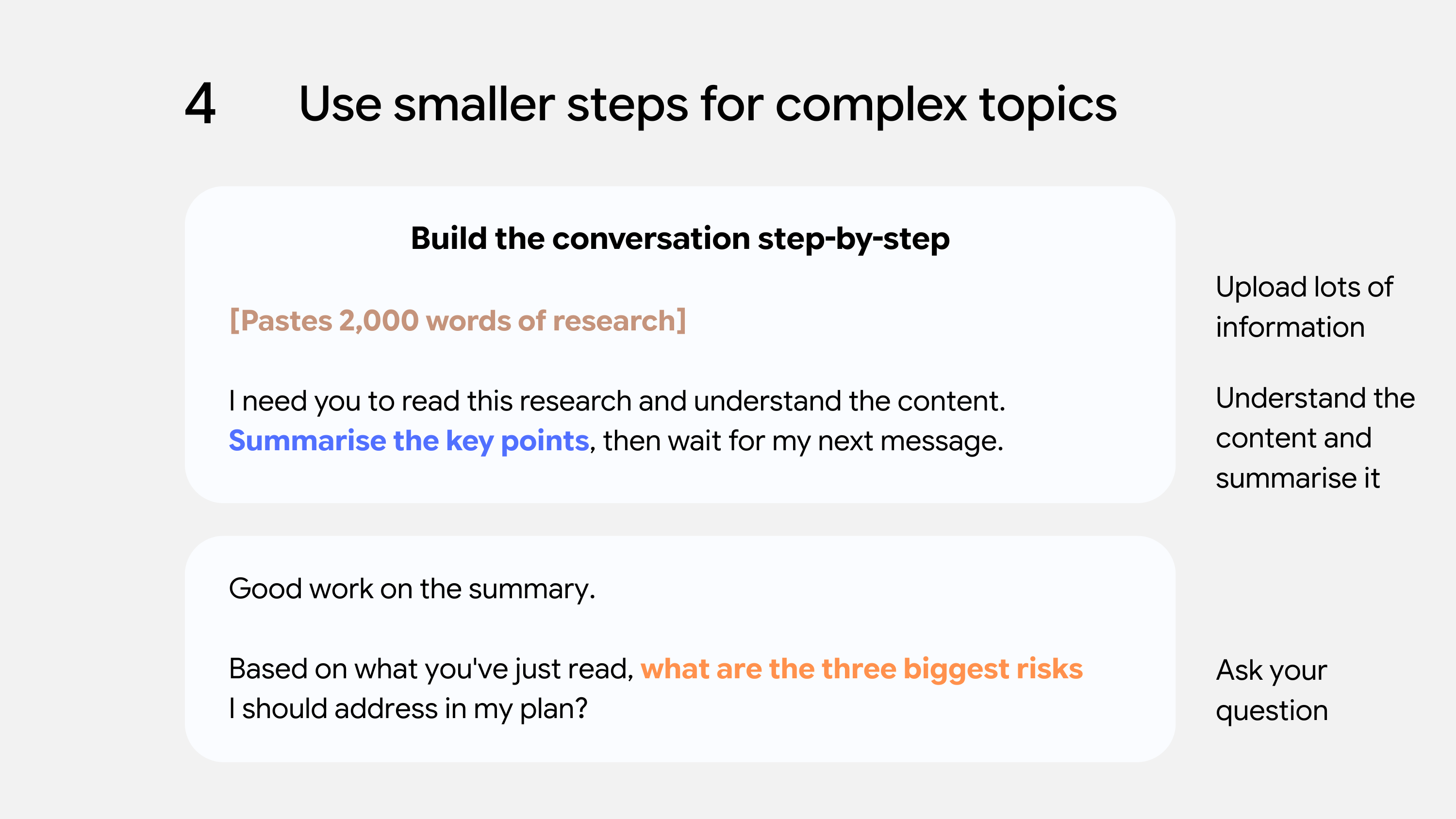
If you need to send lots of information, you can ask the AI model to "understand" the content and wait for your next message. This gives it a chance to process everything before you ask your actual question - and I've found that it leads to much better responses.
Define a role for the AI
This feels a bit odd at first, but it works. If you start your prompt with something like "You are a senior copywriter with 15 years of experience" or "You are a patient teacher who's explaining a topic to a complete beginner", you'll find that genuinely changes how the AI responds.
By doing this, you can quickly set the scene for the AI model - allowing it to infer the tone, vocabulary, and knowledge level that should be used in its answers.
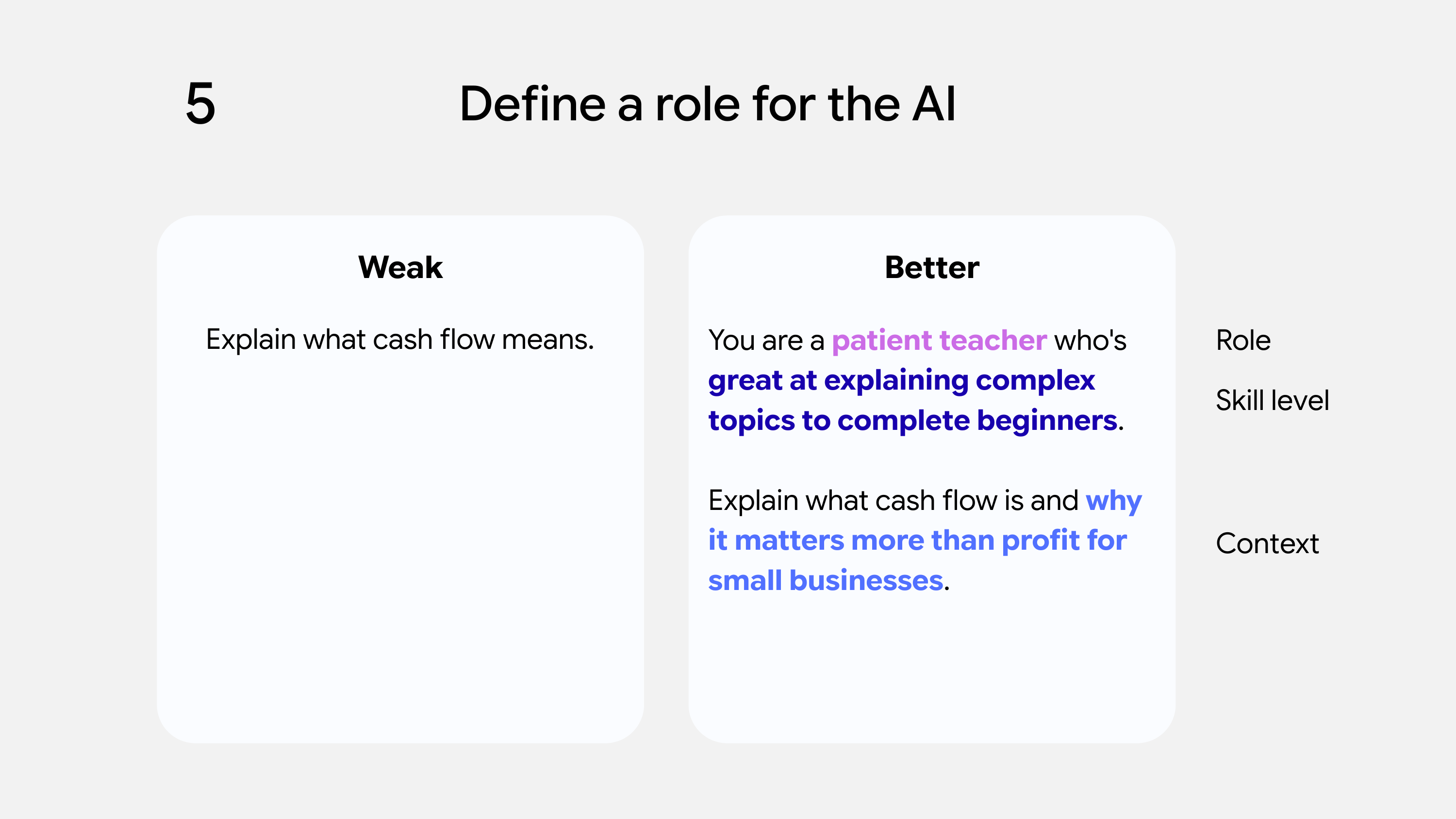
This is worth experimenting with to get the best results, but it helps the AI understand its role and what you're trying to achieve. It might seem a bit gimmicky, but you'll notice a difference in the responses you get back.
The mistakes that everyone makes
After seeing hundreds of people use AI tools, there are certain patterns that emerge. Here's what trips beginners up most often.
Being too vague
We've covered this earlier, but it's worth repeating. Being specific is everything.
Not specifying the format or length
If you don't say how long you want something, you'll get whatever the AI defaults to - which is usually longer than you need. By adding "Keep it under 150 words" or "Give me 5 bullet points", you'll save yourself a lot of editing time.
Accepting the first response
Most people treat the AI's first answer as final. But it's not, it's just a starting point that you can build on. You can get more value from the second or third interaction, as you're steering the AI model in the right direction.
Asking for too many things at once
"Write me a blog post, suggest a title, create social media posts to promote it, and come up with an email subject line" - that's four separate tasks. If you asked a human to do that within 30 seconds, you'd get mediocre results for all of them. It's the same with these AI models. You need to ask one thing at a time and gradually build from there.
Iteration is completely normal
Going back and forth with the AI isn't a sign that you're doing something wrong, it's part of the creative process.
Think of it as a conversation, not a one-shot request. You're collaborating with a very fast, very patient assistant who never gets annoyed when you change your mind.
Once you've created a prompt that works well, make sure that you save it - as it'll come in handy for the next time.
By looking back on the prompts that work, you can spot trends and better understand how the AI model is working.
Quick wins that you can use today
Here are a few techniques that will immediately improve your results:
Be specific about what you want
Tell the model exactly what you need. What format - an email, a report, or bullet points? How long should it be? What tone - formal, conversational, or persuasive? Who's going to read it? The more specific you are, the better your results.
Provide context about your situation
The AI doesn't know your company, your audience, your constraints, or why you need this in the first place. Before you write a prompt, imagine handing this task to someone who knows nothing about your industry. What would they need to know to do it well? Include those details.
Give examples of what good looks like
If you've got an example of the kind of output you want - a previous email that worked well, a report format you like, or a writing style you're aiming for - paste it into your prompt. The AI will pick up on patterns that you might struggle to articulate.
Break complex tasks into smaller steps
Don't dump everything into one massive prompt. Ask the AI to tackle the first part, review what it gives you, and then move on to the next. This gives you more control and helps you spot problems earlier.
Define a role for the AI
Start your prompt with something like "You are a senior copywriter with 15 years of experience" or "You are a patient teacher explaining this to a complete beginner." It feels a bit odd at first, but it genuinely changes how the AI responds.
Use "step by step" for anything requiring reasoning
If you need the AI to think through a problem - whether it's analysis, planning, or troubleshooting - add "think through this step by step" and encourage the model to show its working, rather than jumping straight to a conclusion.
Tell it to ask you questions
End your prompt with "Before you start, is there anything else you need to know?" Sometimes the AI will spot gaps that you hadn't thought of.
Iterate and refine
Don't treat the first response as final - it's a starting point. Refine from there: "Make it shorter." "Less formal." "The opening is too weak, try again." Think of it as a conversation, not a one-shot request.
Want to get even better results?
This guide covers the fundamentals - enough to get noticeably better results than most people. But if you're using AI regularly for professional work, there's another level.
The Advanced Prompt Engineering guide covers the techniques that most people never learn:
- How to get AI to reason through complex problems (not just summarise them)
- The "few-shot" method for making AI match your exact style
- System prompts: how to set up AI tools so they work the way you need
- Why most "prompt templates" online don't actually work - and what to do instead
It's the difference between "that's helpful" and "how did you do that?"
To get started, use the link below.