 Loop
Loop Get free newsletter
How to build an advanced
voice agent
Everything you need to get started and build your first voice agent,
even if you've never built one before.Sponsored by
Over the last few years, we've seen huge advances in voice technology as it's now significantly more reliable and able to understand a wide variety of accents.
We've moved on from the clunky voice assistants of the last decade, where you had to speak slowly and just hope that it understood what you said. Today's voice agents are much more capable, as they're able to hold proper conversations and complete tasks for us - which is incredibly exciting to see.
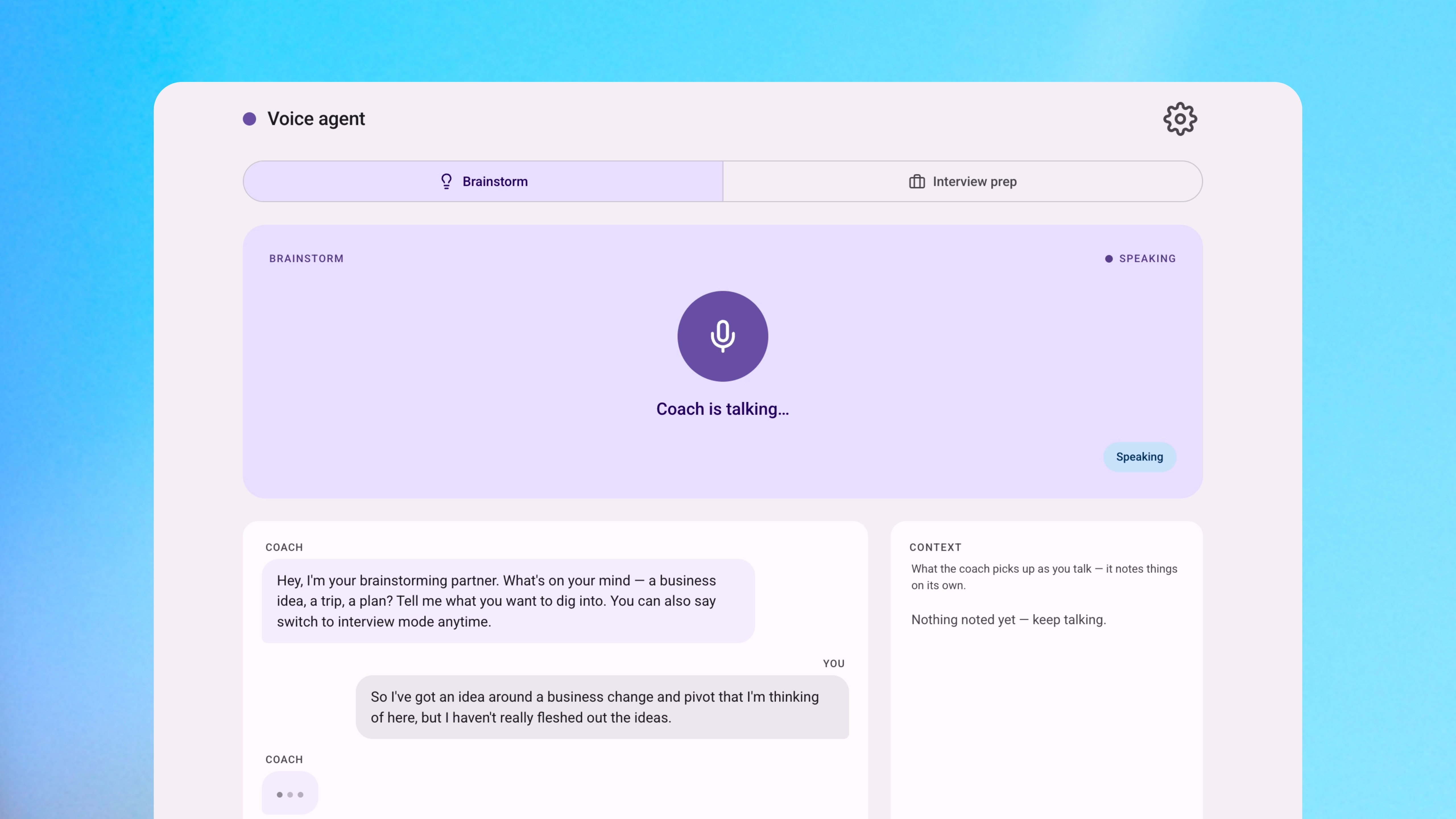
In one weekend, I built an AI coach that helps me prepare for upcoming interviews, think through the big decisions out loud, and explore ideas in greater depth. In this guide, I'll cover exactly how I did it, what voice agents actually are under the hood, and how you can build your own.
Special thanks to AssemblyAI, who are sponsoring this post and have just launched their new realtime speech-to-text model. I've put the model through its paces and included my honest experience of voice agents - what worked, where it struggled, and where the real opportunities are for businesses.
This guide will walk you through the entire process, so don't worry if you're not technical. AssemblyAI are also offering Loop's readers $50 in free credits, which is more than enough to build your first voice agent.
How voice agents are being used today
Since the technology has improved so much in recent years, there's a growing list of use cases that simply weren't possible before. Whether it's for your own personal work or business, here are some use cases that work well:
Personal work
Prepare with your own personal coach
Get tailored feedback on your presentation, explore different decisions, and prepare for an upcoming interview.
Talk through a problem out loud
Go for a walk, talk through a problem with the agent, and come home to detailed notes.
Explore a topic in depth
Ask follow-up questions and go deeper into the topic, rather than skimming walls of text.
Capture voice notes
Write down ideas, schedule reminders, and create to-dos without having to use a keyboard.
Practice a new language
Practice your pronunciation and learn another language (can be hit-or-miss depending on the voice you select).
Study a topic
Ask the agent to quiz you on a topic that you've just learnt.
Business workflows
Handle customer support calls
Understand mumbled order numbers, email addresses, and names without missing the key details.
Capture meeting notes
Listen during your meetings and create a structured summary once the call ends.
Coach your sales team during calls
Listen to sales calls and suggest how your team could respond to a customer's concerns.
Support customers in any language
Help customers that need to switch between languages, without anyone having to repeat themselves.
Triage internal IT and HR requests
Answer the common questions that a person has, then escalate when a human is actually needed.
Run customer research interviews
Speak to dozens of customers at scale and have the notes ready for your team.
Creating an AI voice coach
I always like to get a second person's opinion and have my ideas challenged, but people are busy and it's not something that can always be done. So I built an AI coach that helps me to explore different ideas, prepare for upcoming presentations, and rehearse the tricky questions I might get afterwards.
I simply start talking and the voice agent listens to my presentation, then it gives feedback at the end - with a list of different things that I could improve. This also works well for brainstorming ideas and talking through my decisions, as I can get the same pushback from the AI agent.
While LLMs are incredibly powerful, I'm starting to become overloaded with walls of generated text. There's only so much that you can read and I've found that I'm just skimming the text, rather than actually reading it. Voice models are different as they allow us to have a proper back-and-forth conversation, which makes the AI a better thinking partner compared to the narrow experience you get in a chat window.
The best thing is that I can use this anywhere. I can go for a walk and talk about a problem with the voice agent, then head back home with detailed notes waiting for me. I was honestly surprised by how cheap and fast this is to run. The speech layer only costs $0.45 per hour, and responses come back almost instantly - which is low enough for my use case and allows me to run it everyday.
What AI tools were used?
I only needed three things to get this working:
AssemblyAI (listening) - uses the new Universal-3.5 Pro Realtime model and turns your speech into text, which does lots of the heavy lifting for you.
Claude (thinking) - analyses what you said and creates a response.
Cartesia (speaking) - responds back to you with a voice model.
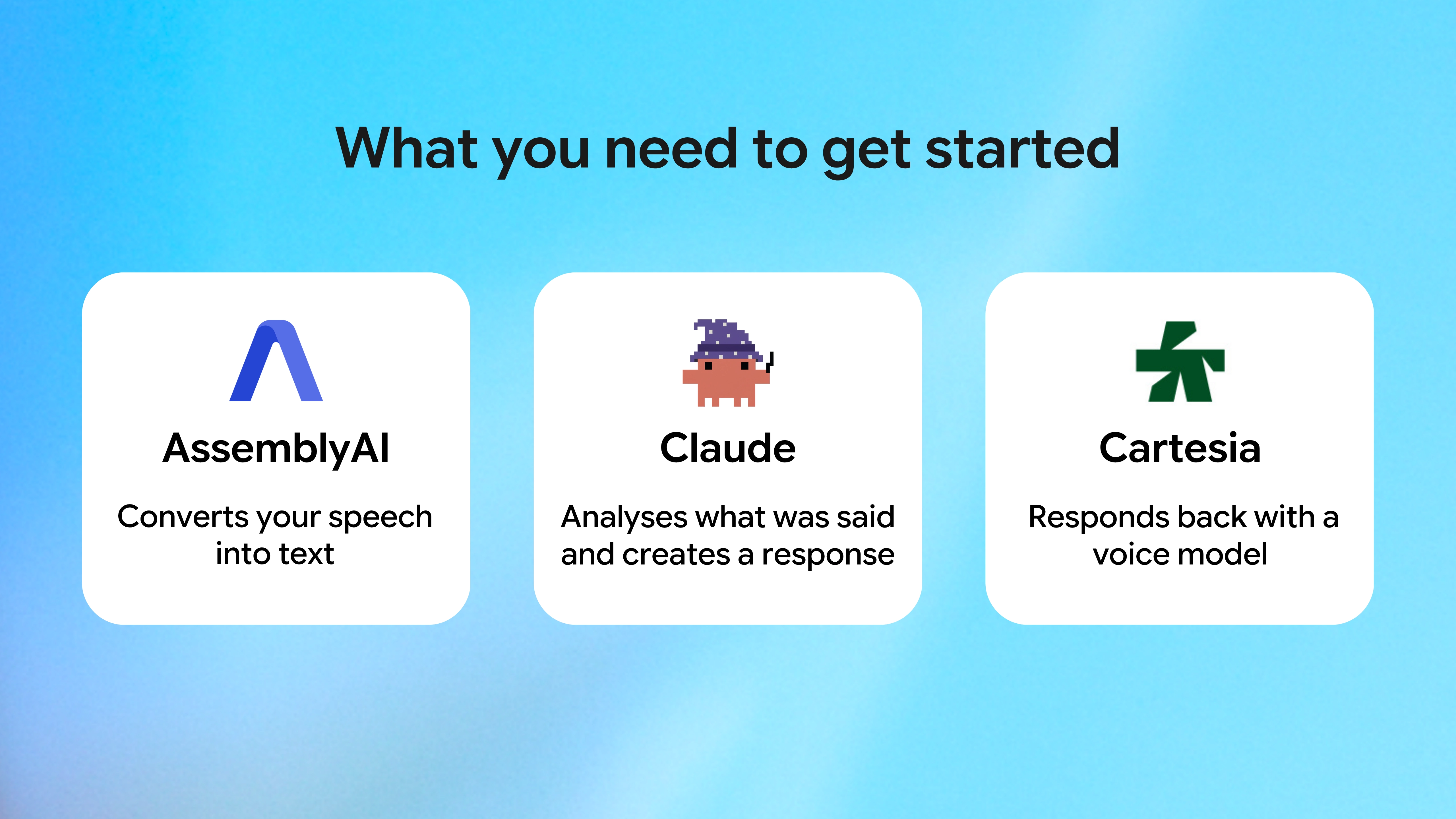
That's it. You can get setup in just a few minutes and Claude Code can walk you through the entire process.
Getting started
If you prefer not to start from scratch, simply download my template and you'll have your own voice agent running in a few minutes.
Get your API key from these three services and keep them in a secure place:
AssemblyAI (speech-to-text) - sign up at assemblyai.com and copy your key. You get $50 in free credits to start, which is more than enough to build and test your first agent.
Anthropic (generates the response) - platform.claude.com → API keys → create an API key and copy it.
Cartesia (the voice) - play.cartesia.ai → API keys → create an API key and copy it.
You can save these keys in a password manager, or anywhere else you'd like.
- If you're on a Mac, press
Cmd + Space, type "Terminal" and press Enter. - If you're on Windows, search for "PowerShell" in the Start menu and open it.
git clone https://github.com/liammc44/build-advanced-voice-agent.git
cd build-advanced-voice-agent
python3 -m http.server 8000 --directory web
localhost:8000. You'll now see the website. Click the gear icon (top right) to open Settings, and paste all three keys.Don't worry, your API keys are only visible to you and are not stored elsewhere.
Customise the voice agent for your use case
Now that you've got setup, you can change some of the agent's settings and tailor it for your specific use case. While most people will simply adjust the system prompt, there's a lot more you can do to improve the agent's performance.
1. Give the agent more context about your conversation
When your agent asks the user a question, you should send that question into agent_context. This is really helpful for the AI model, as it can use this context to figure out what the user is likely saying - especially when the audio is unclear or muffled.
For example, if the agent has just asked "what's your email?", there's the risk that the model could write it as "user at example dot com". But if you include the agent_context, the agent will write user@example.com instead. The same approach works for names, dates, account numbers, and confirmations - anything where you know the rough shape of what's coming.
If you've got specific names, products, or terms that come up often and the model is unlikely to know them, you can use keyterms_prompt to improve their recognition. The model will use this list of words when it hears something ambiguous and ensures that it makes fewer mistakes. For example, "Vercel" might come out as "Ver sell" without the keyterms_prompt.
2. Focus the agent on the right speaker
You can use voice_focus to filter out any background noise and lock onto the primary speaker.
Primary speaker
Kept in focus
The background noise is ignored and the model only focuses on the primary speaker.
You can also select two modes for the voice focus, which allow you to handle different audiences and environments:
near_fieldUseful for headsets, phones, and earbuds. Places more focus on the speaker that's right next to the mic.
Use when the user is holding their device.
far_fieldUseful for rooms, kiosks, and the outdoors. Slightly looser focus, so it prioritises the loudest voice in the space.
Use when the user is a few feet away.
3. Stop the agent cutting you off mid-sentence
You can use turn_detection to control when the agent thinks you've finished speaking. By default, it uses a combination of silence, tonality, and pacing to work this out - which works well for most cases. But if the agent feels a bit too jumpy and is cutting you off, or is too slow and waiting awkwardly, you can adjust the settings.
To do this, you can change:
end_of_turn_confidence_thresholdHow confident the model is that you've actually finished speaking before it replies. The higher you set it, the more sure it needs to be (default is 0.7).
min_turn_silenceThe shortest pause that counts as the end of a turn.
max_turn_silenceA hard cap on how long the model will wait.
For example, if you're building a coaching agent or anything where the user pauses to think, you should set min_turn_silence a bit higher (around 800 to 1000ms) so that the agent waits before responding. But if you're developing a voice agent for drive-throughs or somewhere people speak quickly, you can keep this low.
4. Shape the agent's personality and give clear instructions
You can use system_prompt to give the agent a clear idea of what its role is, how it should respond to users, and what it should do. It's another important aspect, as it shapes the personality and behaviour of your agent.
For my coach build, the system prompt does most of the work for me. It tells the agent to act as an interview coach, keep responses to two sentences, push back on weak answers, and give structured feedback at the end. Without those instructions, the LLM defaults to giving long-winded essays that aren't well suited for voice.
When you're writing your own prompt, here are a few things you should consider adding:
- Always cap the response length explicitly - e.g. "respond with a maximum of two sentences"
- Tell it to ask one question at a time, rather than stack them up and overwhelm the user
- Tell it to push back on ideas when necessary, rather than simply agreeing by default
- Be specific about the format it should use
Here are a few example system prompts you can adapt as a starting point:
You are a behavioural interview coach. You help the user rehearse for upcoming interviews and sharpen how they answer. - Keep every spoken response to two sentences at most - this is a back-and-forth, not a lecture. - Ask one question at a time, wait for the full answer, then dig deeper before moving on. - Coach answers towards the STAR format (Situation, Task, Action, Result) and flag when one is vague or missing the result. - Push back on weak answers and ask for a specific example or a number to back it up. - At the end, give structured feedback: two things that worked, two to improve, and one thing to practise next.
You are a front-line customer support agent for [company]. Quickly understand the customer's issue, then either resolve it or route it to the right team. - Open by acknowledging the problem so the customer feels heard, then keep replies to two sentences at a time. - Ask one clarifying question at a time until you genuinely understand what's gone wrong. - Read key details back to confirm them (order numbers, email addresses, dates) before acting on anything. - Stay calm and friendly, even if the customer is frustrated. - For billing or technical issues, hand off to the specialist flow rather than guessing at an answer.
You are a sales rep running a discovery call. Your goal is to understand the prospect's situation and qualify the opportunity - not to pitch. - Keep your turns to one or two sentences and let the prospect do most of the talking. - Ask open questions one at a time about their goals, current tools, pain points, timeline, and budget. - Don't just agree - gently challenge assumptions and dig into anything that sounds vague. - Listen out for buying signals and objections, and follow up on them. - Summarise what you heard at the end and propose a clear next step.
You are a friendly, patient language tutor helping the user practise [language] through natural conversation. - Speak mostly in [language] and match your difficulty to their level, keeping each turn short and simple. - Ask one question at a time to keep the conversation flowing naturally. - When they make a mistake, gently correct it, model the right phrasing once, then carry on - don't break the flow. - Introduce a new word or phrase now and then, and briefly explain what it means. - At the end, recap the new vocabulary they picked up and what to focus on next.
If you want to step this up a notch, you can also change the system prompt mid-session - which is really useful for agents that have to handle a wide range of conversations.
For example, a customer support agent could start with a general triage prompt that handles common questions, then swap to a more specialised prompt when the conversation moves into billing or technical topics. The conversation history stays intact, so that the user doesn't have to constantly repeat themselves.
5. Give the agent memory
For the agent to hold a proper conversation, it needs to remember what's already been said. The way this works is that you keep a running list of the conversation and send it to Claude on every turn, so each reply has the full context behind it.
This works really well for short sessions, like preparing for interview questions or brainstorming a single decision. For longer sessions that span several days, you'll want to summarise the older parts of the conversation yourself and feed that summary back in via the system prompt at the start of each session, so the history doesn't grow forever.
6. Include the expected language
While this isn't necessary and the agent can automatically detect the language for you, it is good practice and helps to eliminate any unnecessary mistakes.
Leave language_code out and the model detects the language for you - it can even handle switching between languages mid-conversation.
Set language_code to a single language for slightly better accuracy, when you know the conversation will always be in that one language.
To pin one, set language_code to the two-letter code for your target language:
enEnglishesSpanishfrFrenchdeGermanitItalianptPortuguesearArabicdaDanishnlDutchheHebrewhiHindijaJapanesezhMandarinviVietnamesefiFinnishnoNorwegiansvSwedishtrTurkishIt's also worth mentioning SpeakerRevision, which allows you to label different speakers in the same conversation, with the agent correcting any earlier mistakes as it learns more about each voice. This is really useful if you're building something like a meeting notetaker, where you need to know who said what and manage several different speakers.
Where this is heading
We went into a lot of the technical details, but it's worth stepping back and thinking about where this technology is actually heading - and how businesses can use it.
In the last few years, we have seen huge advances in Large Language Models - which are generating more text than ever and changing the way that we work. But more text isn't always better, as I've found myself skimming more than I'm actually reading - and I'm not the only one doing this.
As models become more capable, I've noticed that my colleagues are increasingly using voice models to talk with their AI - as it's much faster than typing and they can give it more context about their problem.
Dense, and easy to skim past the walls of text - but hard to actually take in.
You talk as fast as you can think, plus the replies are short enough for you to properly absorb them.
This trend is only going to accelerate in the coming years, as more industries start to use the technology and bring it into their workflows. Now that we have voice models that are incredibly quick, perform well, and can store memory - the sky's the limit with the potential use cases and the problems we can solve.
Key takeaways
Now that we've gone through the process of building an AI agent, here's a summary of what we covered and some tips that you can apply when you're trying this yourself.
1. Don't overlook the personal use cases
While a lot of people focus on business use cases - of which there are plenty - don't forget to explore how this could help you personally and change the way you work. We did this by building an AI voice coach that helps us prepare for upcoming interviews, make important decisions and explore them in greater detail, or brainstorm different ideas.
I've become quite tired of the chatbot experience in recent months, which is why I was keen to build my own thinking partner and talk through the ideas instead.
It'll be interesting to see how this evolves in the coming years, but I do think this is an emerging area that will only become bigger as LLMs do more tasks for us.
2. You don't need to be technical to build your own voice agent
Technology has changed a lot recently and you no longer need to write the code yourself, especially if it's a pretty straightforward idea. Claude Code is a great tool, as you can simply paste AssemblyAI's documentation and ask it to build a voice agent for you.
It's incredibly easy to get started and the technical aspect is not a huge barrier anymore for testing ideas. Instead, it's deciding what you want it to do and how you can scale that efficiently.
3. The system prompt does most of the work
I showed you several important settings and how you can tweak them to get better results from your voice agent. They're worth bearing in mind, as they give you extra control on top of the prompt.
But the core prompt is important for shaping your agent and how it interacts with people. As you start to use the agent more often and see how it performs, you can iterate on this prompt over time and constantly improve it.
4. Don't over-engineer it
Voice agents have a reputation for being complicated, but most of that comes from teams that got stuck in framework conversations before they'd even built anything.
Instead, you should start small and test your ideas. As I've shown already, you can do that in just 30 minutes and build on the idea from there.
Once you've got the prototype working well and consistently, you can start thinking about adding more complexity.
Summary
Overall, I've been really impressed by how far voice agents have come. They're now reliable enough to build something genuinely useful in just a weekend, and by combining AssemblyAI's Universal-3.5 Pro Realtime model with Claude and Cartesia, you can go from an idea in your head to a working voice agent - without having to write any code yourself.
Build your own voice agent
Try AssemblyAI's new Universal-3.5 Pro Realtime model for yourself. They give you $50 in free credits to start, which is more than enough to build and test your first agent - as I only used a few dollars to create my own voice agent.
If you found this guide useful, you'll enjoy my weekly newsletter - every week I analyse the latest AI advances and how you can use them. It's free and you can unsubscribe at any time.

Read by executives at:

You might also like

Create your first AI agent
A comprehensive guide to building and deploying your first AI agent.
Claude Code Advanced
Practical guide for getting the most out of Claude Code — from writing clear prompts to using plan mode, MCP servers, and CLAUDE.md.

Create a short film with AI
The workflow I used to create an animated short in three days, with zero filmmaking experience.